
For a while now we've been chasing a pretty unglamorous problem: Bitcoin's layers keep getting more useful, and the wallet experience keeps making people work too hard.
We already attacked the fragmentation problem. One wallet for Lightning, Spark, Liquid, Rootstock, Arkade, Citrea and base-layer Bitcoin. Swaps in the app. Stablecoins sitting next to your sats instead of living in some other tool you forget about.
The next bottleneck showed up pretty fast.
Nobody wants to tap through five screens to pay an invoice, check a Spark balance, or move USDB. They want to say what they need and have a competent assistant handle the mechanical bits. That only works if the assistant can talk to a real wallet. And it only works if that wallet never takes custody.
So we are rolling out an agentic wallet inside Layerz.
What an agentic wallet actually is
An agentic wallet is a self-custodial Bitcoin wallet that AI agents can operate through a controlled set of tools.
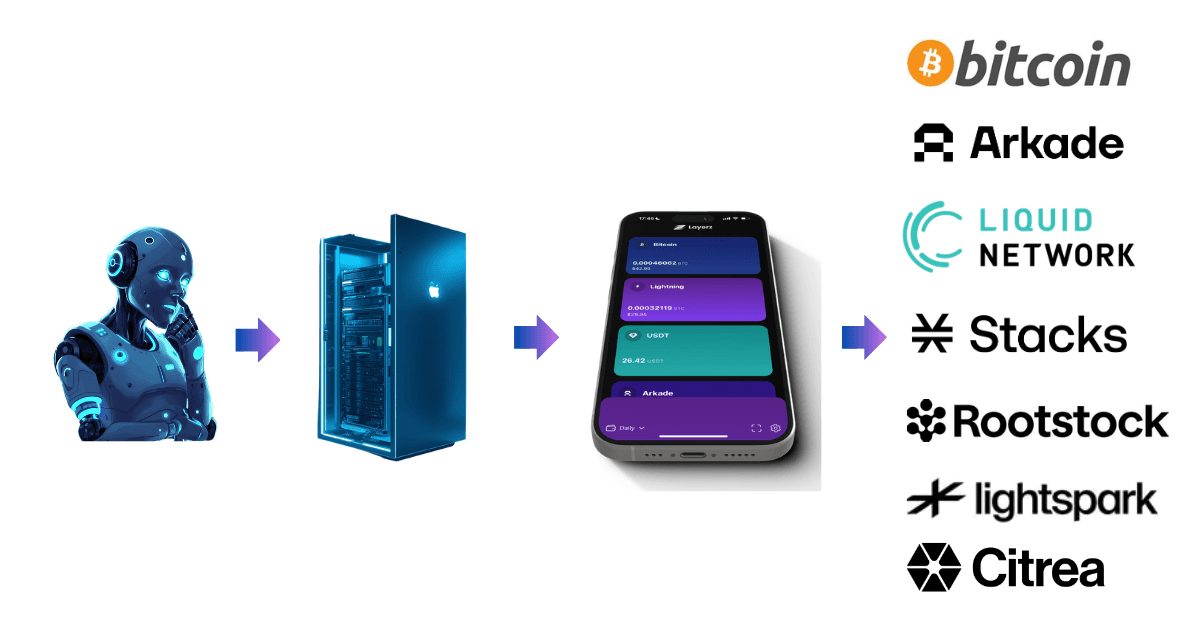
In practice: you connect Grok, Claude, ChatGPT, or any MCP-compatible agent to Layerz. The agent then does wallet jobs you allow, using real tool calls instead of screenshots, OCR, and hope.
It is not a custodial bot holding your coins. It is not a script that drives your UI. It is definitely not "paste your seed into a chatbot."
Your keys stay in Layerz. The agent calls tools. The wallet executes.
We use the Model Context Protocol (MCP), the open standard a growing pile of AI apps already speak. Layerz runs an MCP server in the wallet. Your agent connects with a private tunnel URL, or a local-only endpoint on desktop, and gets access to the tools we expose in the wallet.
That is the whole product idea. Keep Bitcoin non-custodial. Give automation a proper interface.
Why bother
Two things matured at once.
Bitcoin layers can finally do the boring useful stuff: instant payments, stablecoin balances, swaps, token transfers, NFTs on supported networks. Layerz already pulls those layers into one place.
And AI agents stopped being conference demos. People live in them now, inside messaging apps, IDEs, and personal assistants. What they still lacked was a wallet they could use without turning into a honeypot.
If the agent can only "advise," you still click everything. If the agent holds keys, congratulations, you reinvented a sketchy exchange. The useful middle is tool access with boundaries.
That middle is the Layerz AI Agent account.
How it works in Layerz
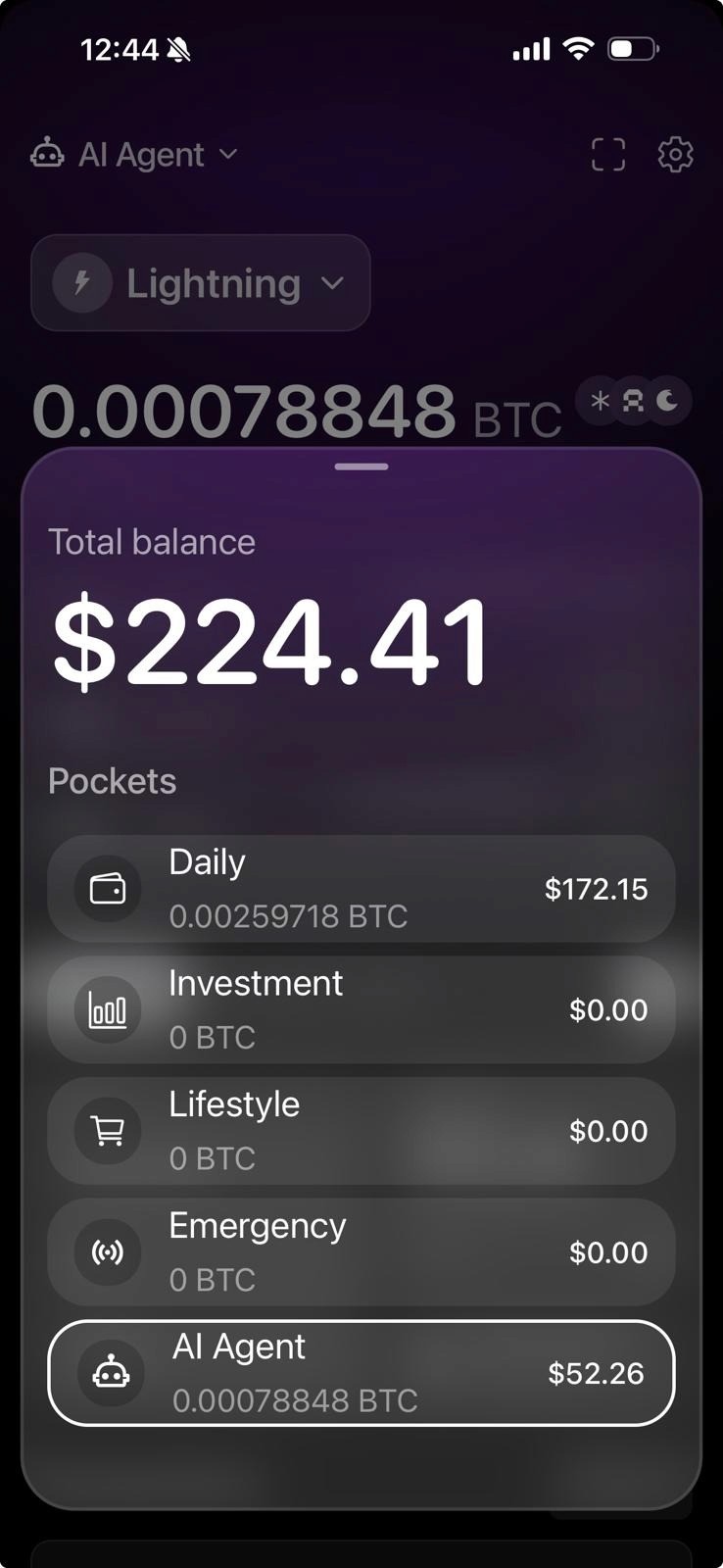
A dedicated AI Agent pocket
The agent does not share a pile with your life savings by default. Layerz gives it a separate “account” or as we call it “pocket” labelled AI Agent.
Fund it with what you are willing to automate. Leave long-term holdings in your other pockets. If a model misunderstands a prompt, the blast radius is the budget you chose to put in the agent pocket.
The agent dashboard shows a simple Budget view so you can see what is available and what has been spent.
Activate, connect, go
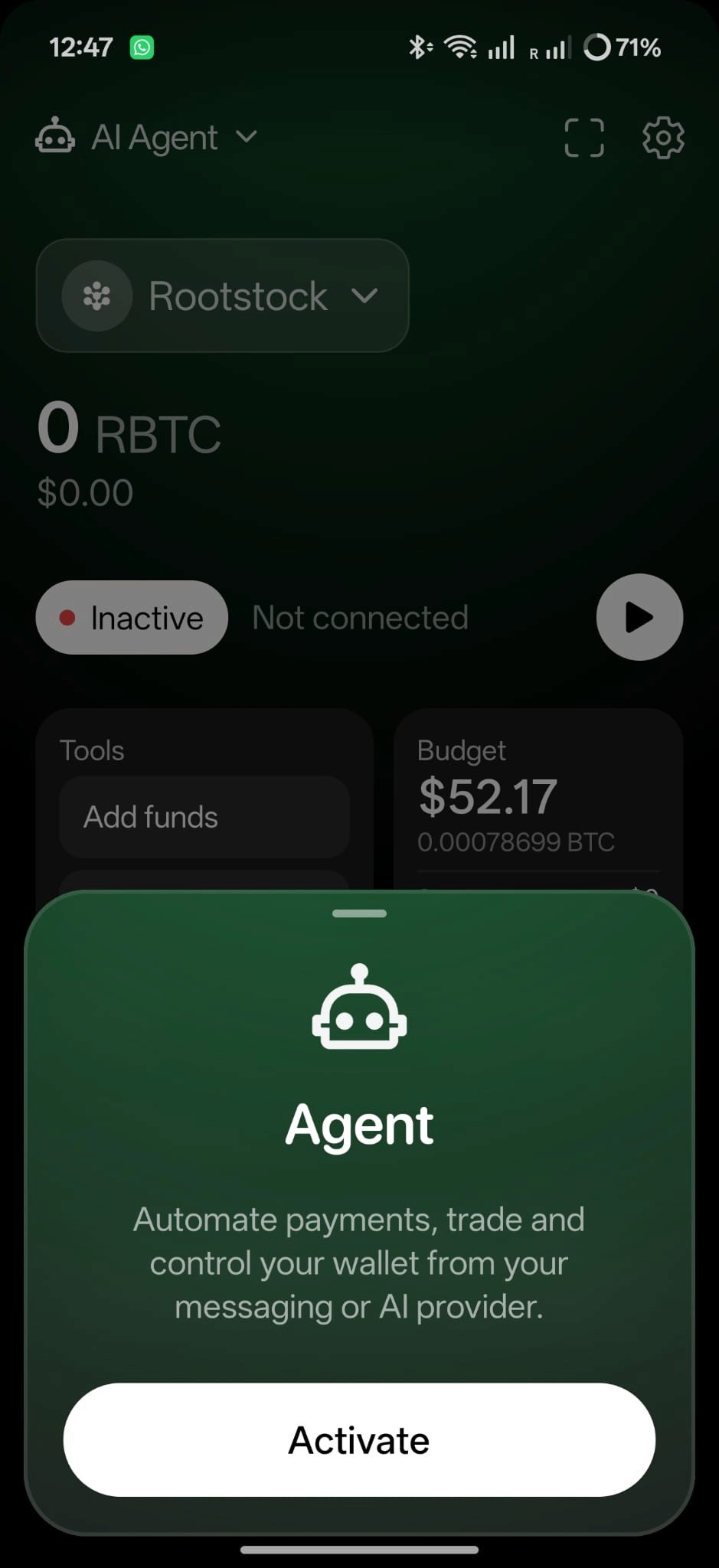
Open the AI Agent account and hit Activate. Layerz starts the MCP tunnel and shows a connection URL.
Paste that URL into your AI provider or local agent config the same way you add any MCP server. Claude, GPT-based agents, local MCP clients, whatever speaks the protocol over HTTP.
On desktop you can flip local-only (closed circuit) mode. The wallet listens on your machine or local network and skips the public tunnel. Nice when your agent already runs on the same desk as the wallet.
Permissions you can see
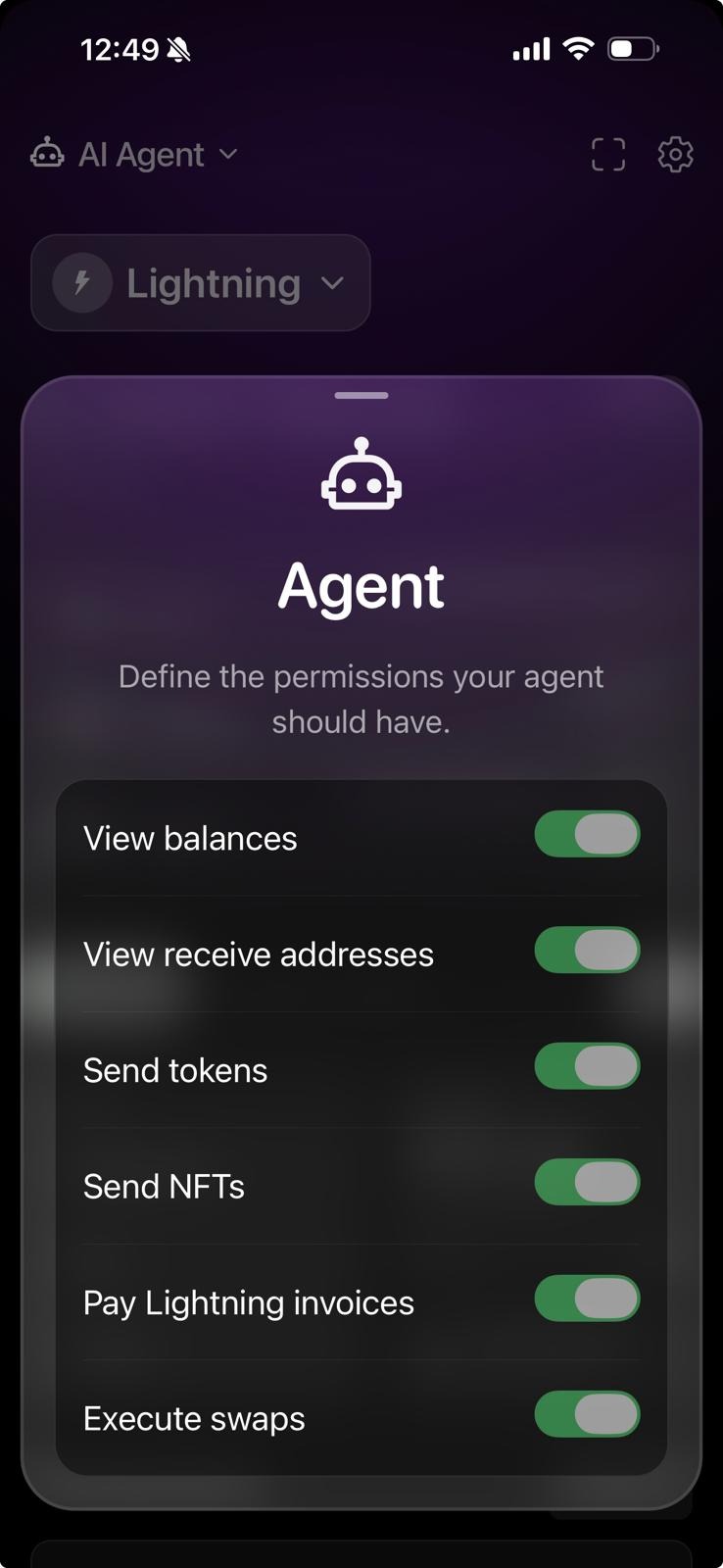
The agent UI is built around capability buckets that match the tool groups:
• View balances
• View receive addresses
• Send tokens
• Send NFTs
• Pay Lightning invoices
• Execute swaps
Before you point a model at live funds, you should know what it is allowed to do. Also treat the tunnel URL like a password. Anyone who has it can call the tools currently exposed on that wallet. Only put it into agents and machines you trust. Pause the agent when you are done.
Real tools, not vibes
Once connected, the agent works through explicit tools. Here is an honest sample of what is rolling out:
Read and receive
• List supported Bitcoin networks
• Get network balances (human-readable amounts plus exact base units)
• Get receive addresses
• List fungible tokens and NFTs
• Get the BTC/USD rate
• Look up a Bitcoin transaction by txid
Lightning
• Create a BOLT11 invoice
• Check whether an invoice you created was paid
• Pay a Lightning invoice
• Get or claim your Lightning Address on layerz.me
Move value
• Transfer native coins on supported networks
• Transfer tokens and NFTs where supported
• Quote and execute on-chain Bitcoin sends (fee rates, quote, then broadcast)
• Get a Spark deposit address and claim deposits after confirmations
Swaps
• Get a swap quote (nothing moves yet)
• Execute a previously quoted swap
Amounts go across as exact base units. Quotes expire. Lightning payments can take a while, so serious agent setups need long HTTP timeouts. We wrote the tool descriptions for models on purpose. Vague APIs make expensive mistakes.
If you want the source of truth, it is public: github.com/layerztec/layerzwallet under shared/features/mcp/.
Things people actually do with it
Pay from chat. "Pay this Lightning invoice and tell me what fee we paid." The agent hits pay_lightning_invoice from the agent pocket and reports back.
Collect without baby-sitting the app. "Create a 25,000 sat invoice with memo design sprint and tell me when it clears." The agent creates the BOLT11, shares it, and checks is_invoice_paid.
Spark and stablecoin chores. Check Spark balances, list USDB, pull a swap quote from BTC to USDB, show the human-readable amounts, and only execute after you approve the quote in the conversation.
Grab a receive address without network bingo. "Give me a Liquid receive address" should not require three taps and a memory test.
Quick pocket check before you travel. Have the agent summarise the agent account across networks, then top up or drain it on purpose.
Same pattern every time. You own intent and limits. The agent handles fiddly wallet steps. Layerz keeps custody on your device.
Self-custody still means self-custody
I want this bit loud, because "AI + wallet" marketing gets sloppy fast.
Layerz is non-custodial. We do not hold your keys. The agent does not get your seed phrase. Tools run in the wallet runtime. The dedicated AI Agent account is how you size risk. Pausing the agent stops tunnel traffic. Open source means you can audit what those tools do.
If a product asks you to paste a recovery phrase into a chatbot, close the tab. That is not agentic finance. That is an exit scam with better lighting.
Think of it less like handing someone the building keys, and more like giving a helper a prepaid card with a limit you chose.
Why this belongs in a multi-layer Bitcoin wallet
A lot of "AI crypto wallet" pitches assume one chain and a hot exchange key. Bitcoin users do not live like that.
You pay on Lightning. You hold or move value on Spark or ARK. You touch Liquid or Rootstock because that is where the asset is. You swap when you need to. If the agent only knows one venue, it becomes another silo.
Layerz already exists to collapse that fragmentation. The agent rides the same stack:
• Lightning for instant payments
• Spark for fast BTC and USDB-style balances
• Liquid, Rootstock, Arkade, and the rest where your assets already sit
• In-wallet swaps so the agent is not sending you to three other apps
One line version: all Bitcoin layers, one simple wallet, now with an agent that can use it.
Who this is for?
Builders and power users who already live in Claude, Cursor, or local agents and want Bitcoin actions in the same loop as everything else.
Operators who run recurring Lightning pays, invoice collection, or small treasury chores and are tired of phone gymnastics.
Teams testing agent workflows who need a self-custodial endpoint instead of parking funds on a centralised bot.
Everyday Layerz users who just want to fund a small agent pocket, connect one assistant, and try "pay this invoice" without turning their whole stack over to automation.
You do not need to be an MCP nerd to start. Activate, copy the URL, paste it into your agent, fund the pocket carefully, try a tiny Lightning payment first.
Getting started
1. Download Layerz Wallet from layerzwallet.com.
2. Create or unlock your wallet. Back up your seed properly. Non-negotiable.
3. Open the AI Agent account.
4. Tap Activate and copy the connection URL.
5. Add that URL as an MCP server in your AI client.
6. Move a small amount into the agent pocket.
7. Start with balance checks, then a tiny invoice create or pay.
8. Pause the agent when you are not using it.
Prefer local only on desktop? Use closed-circuit mode so the endpoint stays on your machine. By using a local inference agent setup, this results in the best self-sovereignty stack.
Questions while you test: find us on X at @LayerZWallet or hop into Telegram. Bugs and sharp edges are useful. We build this in the open on GitHub with the rest of the wallet.
FAQ
What is an agentic wallet? A wallet AI agents can operate through structured tools while you keep the keys. In Layerz, that interface is MCP plus a dedicated agent account.
Does using the AI agent make Layerz custodial? No. Layerz is non-custodial. The agent calls tools. Your keys stay in the wallet.
Which AI tools work with Layerz? Anything that can connect to an MCP server with the URL Layerz gives you. Common setups include a harness like Hermes or Openclaw powered by Grok, Claude, GPT-based agents, and local MCP clients. If your stack can add a custom MCP endpoint, you can try it.
What can the agent do today? Read balances and addresses, create and pay Lightning invoices, work with Lightning Addresses, transfer supported native assets and tokens, handle NFT transfers on supported networks, quote and execute swaps, and run quoted on-chain Bitcoin sends. The full tool list lives in the open-source MCP module and will keep growing.
Can the agent drain my main savings? The agent operates against the dedicated AI Agent account. Fund that pocket on purpose. Do not treat it like cold storage.
Is the tunnel URL sensitive? Yes. Treat it like an API key for the permissions enabled on that wallet. Do not post it publicly. Pause the agent when idle. Use local-only mode when you can.
Do I need to leave my phone unlocked the whole time? While the mobile tunnel is live, the device needs to stay reachable. Desktop local mode is often nicer for longer sessions. Start with short sessions and small amounts. We are practical about this.
Is this open source? Yes. Layerz Wallet is open source under the layerztec organisation on GitHub. The MCP feature, tool surface, and tunnel client are in the main wallet repo.
How is this different from exchange trading bots? Exchange bots move IOUs on a company's books. Layerz agents move value from a wallet you control, across Bitcoin layers, with tool-level actions you can inspect.
← Blog